The import utility consists of a java class and a shell script. It imports a text file into a database. At the moment the import utility is the only way to create a shred database.
workbench/import dbname documentname xmlfile [-purge|-create|-recreate]
Import expects the name of the database, the name of the persistent document and the name of the file to import.
The dbname is configured in de/pannenleiter/de/XMLDatabase.
The flag describes how to prepare the database tables.
-purge deletes the old document-create creates the database tables-recreate drops and creates the database tablesIf an element of the text file has an attribute plid it will update the old element, otherwise Import will insert the element into the database.
(Updating records of legacy databases is not implemented yet - the xmldbms package doesn't support it).
This example creates a fresh database for the forum demo.
rmdms/samples/forum > ../../workbench/import test forum init.xml -purge
The export program writes the document to stdout. At the moment it is only able to export from a shred database. The program also consists of a java class and a shell script.
workbench/export dbname documentname [expression]
Export expects two parameters. The name of the database and the name of the persistent document. You can append an expression, which describes a node list. This may be a xpath expression or a sql select statement. If you omit the expression, the program exports the whole document and the top level processing instructions. The root expression ( / ) should export the document without processing instructions, but it doesn't.
The first example exports the database of the forum demo. The second exports the template that is used for new contributions.
rmdms/samples/forum > ../../workbench/export test forum >forum.xml
rmdms/samples/forum > ../../workbench/export test forum /forum/template >forum.xml
Exporting elements by sql select statements is not implemented yet. This release doesn't support xpath expressions on legacy databases. So you can't export legacy databases jet.
The workbench will become a general tool for development and administration of rm -d ms applications.
At the moment it includes a tree editor and a debugger.
The workbench is an ordinary rm -d ms application that displays HTML pages in an ordinary browser.
If you use the saxon processor and the sample server, the url is:
http://localhost:8080/servlet/saxon/workbench/saxon/workbench.plxml
The xml-apache version is called by:
http://localhost:8080/servlet/xmlapache/workbench/xmlapache/workbench.plxml
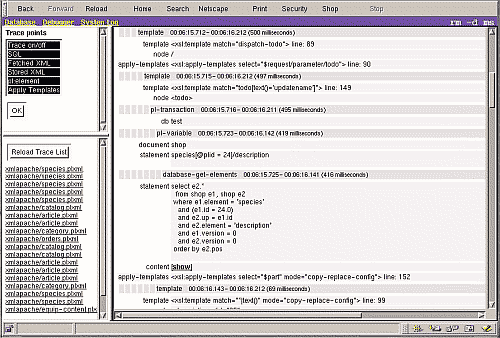
At the moment the debuger is able to trace servlet requests and database operations. A future version will also allow you to step through the XSLT processing.
When you start the workbench, you will see some buttons on the top.
Clicking the debugger button opens it.
The first page describes how to use the debugger.
This is a simple replacement for the terminal monitor of a relational DBMS. It is designed for programmers, not for users.
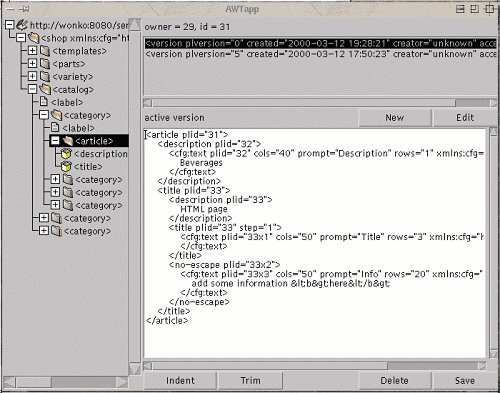
The tree on the left side shows the whole document.
When you click on an element, the top list shows the archived versions.
After clicking edit you can modify a document fragment.
A double click on a deselected list item also works.
If you indented the text, trim it before you write it back - the white space nodes are written to the database.
You can invoke the editor in 2 ways:
The shell script 'workbench/run' expects 3 parameters.
The url of an access file, the database name and the document name
e.g. run http://localhost:8080/servlet/saxon/workbench/saxon/raw.plxml test forum.
Just start the workbench as descibed above and click on the database button.
The first page describes how to start the tree editor.