This chapter describes how to create an old fashioned content management system. It will have an uniform page layout with a navigation bar. To keep it simple, we will use text links for the navigation buttons. The pages will contain HTML that may not be well formed. A simple configuration mask will make it possible for your secretary to edit the content and to add pages.
This tutorial assumes, you have already installed rm -d ms and the forum demo is already running.
If you have already configured your web-server you may use it.
Otherwise it is easier to use the servletrunner of the jsdk package.
The samples directory contains a shell script to set up the CLASSPATH - samples/server.
A rm -d ms project consists of a document that is stored in a database and some XSLT stylesheets.
The stylesheets are plain text files.
So we also need a directory.
The code snip-sets assume that you create this directory next to the forum directory.
To create the database, you can create a text file with your favorite editor and import it into a shred database.
rm -d ms doesn't restrict the doctype of your document.
This example uses a very simple structure.
Our site has 4 pages.
A page has a title and a content.
Since we are going to store not well formed HTML in the database, we will pack the HTML into the text of the content element.
<tutorial>
  <site name="first test">
    <page>
      <title>Welcome</title>
      <content type="html">Content goes here</content>
    </page>
    <page>
      <title>News</title>
      <content type="html">Content goes here</content>
    </page>
    <page>
      <title>Mission</title>
      <content type="html">Content goes here</content>
    </page>
    <page>
      <title>Guidlines</title>
      <content type="html">Content goes here</content>
    </page>
  </site>
</tutorial>

rmdms/samples > mkdir tutorial
rmdms/samples > cd tutorial
rmdms/samples/tutorial > vi init.xml
rmdms/samples/tutorial > ../../workbench/import test tutorial init.xml -create
rmdms/samples > server
rmdms/workbench > run http://localhost:8080/servlet/saxon test tutorial
There are several ways to call an XSL processor from a servlet but at the moment the rm -d ms servlet supports only one way.
The servlet assumes that the 'pathinfo' points to an XML file.
It examines this XML file for an associated XSL stylesheet (an xsl-stylesheet processing instruction).
Since all data comes from the database, the XML file only includes one tag.
<?xml version="1.0"?>
<?xml-stylesheet href="thesite.xsl" type="text/xsl"?>

<page/>
At first, the stylesheet has to figure out which page to display. We will append the primary keys of the title elements to the urls of the navigation buttons. So the stylesheet can fetch this key from the HTTP parameters.
This sample renders a simple page with a gray title bar, a gray bar with vertically stacked buttons and a white content area.
<?xml version="1.0"?>
<xsl:stylesheet
    xmlns:xsl="http://www.w3.org/1999/XSL/Transform" version="1.0"
    xmlns:pl="http://pannenleiter.de/de.pannenleiter.saxon.Store"
    extension-element-prefixes="pl">

<!-- This variable comes from the servlet -->
<xsl:param name="request"/>
<!-- Fetch the key of the title element from the HTTP parameters -->
<xsl:variable name="current" select="$request/parameter/current"/>

<!-- This template renders the HTML page -->
<xsl:template match="/">
 <!-- Open a database transaction -->
 <pl:transaction db="'test'">
  <html>
   <head>
    <title>Rmdms Tutorial</title>
    <meta http-equiv="expires" content="0"/>
   </head>
   <body bgcolor="white" text="black" link="black" vlink="black" alink="black">
    <xsl:choose>
     <!-- If there is a current page, we will display it -->
     <xsl:when test="$current">
      <xsl:call-template name="render-page"/>
     </xsl:when>
     <!-- Otherwise we show an empty page -->
     <xsl:otherwise>
      <xsl:call-template name="render-empty-page"/>
     </xsl:otherwise>
    </xsl:choose>
   </body>
  </html>
 </pl:transaction>
</xsl:template>

<!-- This template fetches the data of the page from the database -->
<xsl:template name="render-page">
 <pl:variable name="page" document="'tutorial'" select="page[title[@plid=$current]]"/>
 <!-- This table places the title bar, the navigation buttons and the content area -->
 <table width="100%" border="0">
  <tr>
   <!-- The title bar -->
   <td bgcolor="#E0E0E0" colspan="2">
    <font size="+1"><b><xsl:value-of select="$page/title"/></b></font>
   </td>
  </tr>
  <tr>
   <!-- The navigation buttons -->
   <td bgcolor="#F0F0F0" valign="top" width="15%">
    <xsl:call-template name="buttons"/>
   </td>
   <!-- The content area -->
   <td valign="top" width="85%">
    <xsl:value-of disable-output-escaping="yes" select="$page/content"/>
   </td>
  </tr>
 </table>
</xsl:template>

<!-- This template renders an empty page -->
<xsl:template name="render-empty-page">
 <!-- This table places the title bar and the navigation buttons -->
 <table width="100%" border="0">
  <tr>
   <!-- The title bar -->
   <td bgcolor="#E0E0E0" colspan="2">
    <font size="+1"><b>Rmdbs Tutorial</b></font>
   </td>
  </tr>
  <tr>
   <!-- The navigation buttons -->
   <td bgcolor="#F0F0F0" valign="top" width="15%">
    <xsl:call-template name="buttons"/>
   </td>
   <!-- The content area -->
   <td valign="top" width="85%"> </td>
  </tr>
 </table>
</xsl:template>

<!-- This one fetches the buttons from the database and renders the text links -->
<xsl:template name="buttons">
 <!-- Fetch the buttons from the database -->
 <pl:variable name="buttons" document="'tutorial'" select="title"/>
 <xsl:for-each select="$buttons">
  <a href="thesite.plxml?current={@plid}"><xsl:value-of select="."/></a>
  <br/>
 </xsl:for-each>
</xsl:template>

</xsl:stylesheet>
Now you can see your pages in your browser.
If you use the servletrunner your URL will be:
http://localhost:8080/servlet/saxon/samples/tutorial/thesite.plxml
You can change the content with the tree editor.
Is it still running?
Click on one of the + signs to open a node of the element tree -
click on an element name -
click on the edit button -
insert your text -
click on the save button.
But remember - we decided to store HTML in the text of a content element.
So you have to type something like This is a test with a <b>bold</b> tag.
(If you want to use normal XML elements, change one line of the stylesheet:
<xsl:value-of disable-output-escaping="yes" select="$content"/> becomes <xsl:copy-of select="$content"/>).
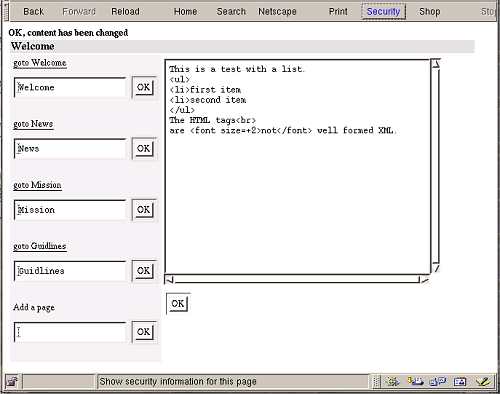
It's hard to edit the content with the tree editor. This chapter shows how to write a configuration mask. It offers 4 different actions. You can look at the content, edit the content, edit the title of a page or add a new page.
There are several ways to do it. This sample uses 4 XML files and one XSL Stylesheet. The XML files will trigger two actions - updating the database and rendering the mask.
look.plxml. This XML file displays the configuration mask.
<?xml version="1.0"?>
<?xml-stylesheet href="configure.xsl" type="text/xsl"?>

<page>
 <show-mask/>
</page>
update-title.plxml. This file calls the update-title template and displays the mask.
<?xml version="1.0"?>
<?xml-stylesheet href="configure.xsl" type="text/xsl"?>

<page>
 <update-title/>
 <show-mask/>
</page>
update-content.plxml. This one calls the update-content template and displays the mask.
<?xml version="1.0"?>
<?xml-stylesheet href="configure.xsl" type="text/xsl"?>

<page>
 <update-content/>
 <show-mask/>
</page>
add-page.plxml. This one adds a new page and displays the mask. The mask should make it possible to edit the content of the new page, but to keep things simple it only displays the navigation buttons.
<?xml version="1.0"?>
<?xml-stylesheet href="configure.xsl" type="text/xsl"?>

<page>
 <add-page/>
 <show-mask/>
</page>
This stylesheet is a copy of the previous one. There are two extentions: it wraps the database text with HTML input tags and it is able to update the database. The "/" template starts processing. It includes an apply-templates tag. So that the further processing depends on the XML file. Normally, one of the 'update' templates and the 'show-mask' template are called. These templates construct new elements and write them into a database.
The PSI editor shows how to edit real XML tags, but this sample uses a different approach.
The tag '<textarea><xsl:value-of select="$page/content"/></textarea>' emits escaped characters e.g '<'.
But an HTML browser displays normal characters e.g. '<' and your secretary can type normal characters.
Internally, the XSLT processor and the database interface use normal characters.
So everything works fine until you render the configured page for your visitor - you have to disable output escaping.
<?xml version="1.0"?>
<xsl:stylesheet
    xmlns:xsl="http://www.w3.org/1999/XSL/Transform" version="1.0"
    xmlns:pl="http://pannenleiter.de/de.pannenleiter.saxon.Store"
    extension-element-prefixes="pl">

<!-- This variable comes from the servlet -->
<xsl:param name="request"/>
<!-- Fetch the key of the title element from the HTTP parameters -->
<xsl:variable name="current" select="$request/parameter/current"/>
<!-- Fetch the new title from the HTTP parameters -->
<xsl:variable name="title" select="$request/parameter/title"/>
<!-- Fetch the new content from the HTTP parameters -->
<xsl:variable name="content" select="$request/parameter/content"/>

<!-- This template renders the HTML cover and calls the actions of the XML file -->
<xsl:template match="/">
 <!-- Open a database transaction -->
 <pl:transaction db="'test'">
  <html>
   <head>
    <title>Rmdms Tutorial - Configuration</title>
    <meta http-equiv="expires" content="0"/>
   </head>
   <body bgcolor="white" text="black" link="black" vlink="black" alink="black">
    <xsl:apply-templates/>
   </body>
  </html>
 </pl:transaction>
</xsl:template>

<!-- This template updates the title of the page -->
<xsl:template match="update-title">
 <!-- We construct a new element and store it in the database -->
 <pl:write name="version-id" document="'tutorial'">
  <title plid="{$current}"><xsl:value-of select="$title"/></title>
 </pl:write>
 <b>OK, title has been changed</b>
</xsl:template>

<!-- This template updates the content of a page -->
<xsl:template match="update-content">
 <!-- We have the key of the title, but we need the key of the content element -->
 <pl:variable name="old-page" document="'tutorial'" select="page[title[@plid = $current]]"/>
 <!-- We construct a new element and store it in the database -->
 <pl:write name="version-id" document="'tutorial'">
  <content type="html" plid="{$old-page/content/@plid}"><xsl:value-of select="$content"/></content>
 </pl:write>
 <b>OK, content has been changed</b>
</xsl:template>

<!-- This template adds a new page -->
<xsl:template match="add-page">
 <!-- The new element will become a child of the site element -->
 <pl:variable name="site" document="'tutorial'" select="/tutorial/site"/>
 <!-- We construct a new element and store it in the database -->
 <pl:write name="new-id" document="'tutorial'" owner="$site/@plid">
  <page>
   <title><xsl:value-of select="$title"/></title>
   <content type="html"/>
  </page>
 </pl:write>
 <b>OK, new page has been added</b>
</xsl:template>

<!-- This template fetches the data of the page from the database -->
<xsl:template match="show-mask">
 <xsl:choose>
  <!-- If there is a current page, we will display it -->
  <xsl:when test="$current">
   <xsl:call-template name="render-page"/>
  </xsl:when>
  <!-- Otherwise we show an empty page -->
  <xsl:otherwise>
   <xsl:call-template name="render-empty-page"/>
  </xsl:otherwise>
 </xsl:choose>
</xsl:template>

<!-- This template places the 3 areas of the page -->
<xsl:template name="render-page">
 <pl:variable name="page" document="'tutorial'" select="page[title[@plid=$current]]"/>
 <!-- This table places the title bar, the navigation buttons and the content area -->
 <table width="100%" border="0">
  <tr>
   <!-- The title bar -->
   <td bgcolor="#E0E0E0" colspan="2">
    <font size="+1"><b><xsl:value-of select="$page/title"/></b></font>
   </td>
  </tr>
  <tr>
   <!-- The navigation buttons -->
   <td bgcolor="#F0F0F0" valign="top" width="15%">
    <xsl:call-template name="buttons"/>
   </td>
   <!-- The content area -->
   <td valign="top" width="85%">
    <form action="update-content.plxml">
     <textarea rows="20" cols="50" name="content"><xsl:value-of select="$page/content"/></textarea>
     <br/>
     <input type="hidden" name="current" value="{$current}"/>
     <input type="submit" value="OK"/>
    </form>
   </td>
  </tr>
 </table>
</xsl:template>

<!-- This template places the 3 areas if we don't have a current page -->
<xsl:template name="render-empty-page">
 <!-- This table places the title bar, the navigation buttons and the content area -->
 <table width="100%" border="0">
  <tr>
   <!-- The title bar -->
   <td bgcolor="#E0E0E0" colspan="2">
    <font size="+1"><b>Rmdms Tutorial</b></font>
   </td>
  </tr>
  <tr>
   <!-- The navigation buttons -->
   <td bgcolor="#F0F0F0" valign="top" width="15%">
    <xsl:call-template name="buttons"/>
   </td>
   <!-- The content area -->
   <td valign="top" width="85%"> </td>
  </tr>
 </table>
</xsl:template>

<!-- This one fetches the buttons from the database and renders the input fields -->
<xsl:template name="buttons">
 <!-- Fetch the buttons from the database -->
 <pl:variable name="buttons" document="'tutorial'" select="title"/>
 <xsl:for-each select="$buttons">
  <form action="update-title.plxml">
   <table border="0">
    <tr>
     <td colspan="2">
      <a href="look.plxml?current={@plid}">goto <xsl:value-of select="."/></a>
     </td>
    </tr>
    <tr>
     <td>
      <input type="text" name="title" value="{.}"/>
     </td>
     <td>
      <input type="hidden" name="current" value="{@plid}"/>
      <input type="submit" value="OK"/>
     </td>
    </tr>
   </table>
  </form>
 </xsl:for-each>
 <!-- This form makes it possible to add a new page -->
 <form action="add-page.plxml">
  <table border="0">
   <tr>
    <td colspan="2">Add a page</td>
   </tr>
   <tr>
    <td>
     <input type="text" name="title"/>
    </td>
    <td>
     <input type="submit" value="OK"/>
    </td>
   </tr>
  </table>
 </form>
</xsl:template>

</xsl:stylesheet>
rm -d ms should include some extendable projects and an IDE.
But at the moment there are no project templates.
If you would like to contribute your project, please send it to rmdms-devel@lists.sourceforge.net.